 PaintVisualizer
 Behr
BehrPaintVisualizer vs Behr
Detailed Feature, Workflow & Real-World Accuracy Comparison
Behr is a dominant brand in residential architectural paint, widely accessible throughout North America through The Home Depot. Its Behr Color Visualizer is one of the most widely used manufacturer paint tools for previewing popular shades like Blank Canvas, Swiss Coffee, and Cracked Pepper.
Behr Color Visualizer is designed around Behr’s proprietary coatings, offering photo uploads, extensive pre-masked sample room scenes, coordinating trim palettes, and direct integration with Home Depot shopping carts. PaintVisualizer.app provides an independent AI visualization platform allowing homeowners and designers to preview Behr colors side-by-side with rivals like Sherwin-Williams, Benjamin Moore, and PPG, with neural lighting simulation and custom HEX support.
This side-by-side evaluation compares personal photo upload handling, edge boundary accuracy, brand catalog flexibility, mobile usability, and project planning workflows.
Quick Comparison: PaintVisualizer.app vs Behr
A comprehensive side-by-side feature matrix verified against active platform capabilities.
| Feature / Capability | PaintVisualizer.app | Behr Color Visualizer |
|---|---|---|
Upload your own photo Personal photo upload supported | Yes | Yes |
Interior visualization Living rooms, bedrooms, kitchens, baths | Yes | Yes |
Exterior visualization Siding, brick, stucco, front doors | Yes | Yes |
Wall visualization Core wall colorization supported | Yes | Yes |
Ceiling visualization Supported in select sample templates | Yes | Limited |
Trim / doors / cabinets Behr supports trim masking in sample rooms | Yes | Yes |
AI-assisted visualization Behr uses edge-detection masking; PV uses neural scene understanding | Yes | Limited |
Color picker Color browsing palettes available | Yes | Yes |
Custom HEX / RGB colors Behr limits selection to Behr catalog | Yes | No |
Paint brand colors PV supports 20+ brands; Behr supports Behr catalog only | Yes | Limited |
Multiple color comparison Coordinating palettes and side-by-side swatches | Yes | Yes |
Before / after slider Interactive split-screen slider in PV | Yes | Limited |
Save projects Account-based saving available | Yes | Yes |
Download results Export digital images | Yes | Yes |
Share results Email and social sharing | Yes | Yes |
Browser support Chrome, Safari, Edge, Firefox | Yes | Yes |
Mobile browser support Responsive web experience | Yes | Yes |
Account required to try Guest testing allowed | No | No |
Free usage tier Free web testing on both | Yes | Yes |
Physical paint sample recommendation Both advise testing physical samples | Yes | Yes |
What Is PaintVisualizer.app?
PaintVisualizer.app is an open AI architectural paint visualizer designed to give homeowners and interior specialists total flexibility when previewing wall colors. Running directly in any web browser without mandatory app installs, users can upload photos of any interior room or exterior facade. The platform neural computer-vision system automatically segments walls, preserving natural window daylight, soft shadows, and flooring reflections. PaintVisualizer.app supports over 5,000+ calibrated swatches from Behr, Sherwin-Williams, Benjamin Moore, PPG, and Asian Paints, alongside custom HEX inputs.
What Is Behr?
Behr Color Visualizer is the official digital room visualizer from Behr Paint Company. Available via web browser and mobile apps, it allows users to upload personal room photos or explore pre-masked sample architectural spaces (living rooms, bedrooms, kitchens, exteriors) to preview Behr paint colors. Features include automated surface detection, coordinating color recommendations, and direct cart integration with The Home Depot.
How Do PaintVisualizer.app and Behr Work?
Compare the step-by-step workflow from uploading a room photo to reviewing final color renders.
PaintVisualizer.app Workflow
Upload Photo via Web Browser
Upload an interior room or exterior house photo on phone, tablet, or PC.
Automated Neural Wall Isolation
AI detects wall planes and surface boundaries without manual polygon drawing.
Select Behr Shades or Compare Rival Brands
Audition Behr colors or compare them against Sherwin-Williams and Benjamin Moore.
Daylight & Shadow Harmonization
Neural engine calculates realistic light absorption and ambient shadow gradients.
Interactive Before/After Slider
Examine the transformation with an interactive split-screen slider.
Export Contractor Spec Sheet
Download high-res renders and color formulas ready for purchasing.
Behr Workflow
Open Behr Color Visualizer Web Tool
Navigate to Behr visualizer on desktop or mobile browser.
Upload Photo or Pick Sample Room
Upload a personal photo or select from pre-masked sample room categories.
Refine Surface Boundaries
Use automated surface detection or manual touch-up tools to outline walls and trim.
Browse Behr Paint Collections
Explore Behr Dynasty, Marquee, Premium Plus collections, and trending palettes.
Apply Digital Color Wash
Click surfaces to fill designated zones with Behr paint shades.
Save Project or Buy at Home Depot
Save your room project, order physical color swatches, or add paint to a Home Depot cart.
PaintVisualizer.app vs Behr: Feature Deep Dive
Detailed technical differences across photo upload, boundary detection, color matching, and rendering.
Photo Upload & Sample Rooms
Accepts personal photo uploads for any space, with automated lighting calibration and perspective optimization.
Supports user photo uploads and offers an extensive library of pre-masked sample architectural rooms across styles.
Surface Masking & Boundary Detection
Neural network segments complex boundaries automatically, preserving intricate trim, curtain folds, and floor lines.
Uses edge-detection algorithms with manual brush and eraser tools to refine masking boundaries.
Color Catalog & Brand Breadth
Enables cross-brand searching across 20+ major manufacturers, LRV metrics, and direct HEX code input.
Focuses entirely on Behr’s architectural catalog, coordinating palette suggestions, and Home Depot purchasing.
Lighting & Shadow Realism
Neural scene understanding preserves natural sunlight gradients, window glare, and room ambient occlusion for realistic depth.
Applies digital pigment overlays with preset opacity blending to simulate Behr paint on designated surfaces.
Before & After Comparison Tools
Interactive draggable split-screen slider provides instantaneous side-by-side inspection.
Provides toggle buttons and side-by-side thumbnail previews.
Export & Home Depot Shopping
Generates high-resolution room renders and color specification sheets for contractor handoff.
Directly integrates with The Home Depot, allowing users to add paint gallons and supplies directly to a shopping cart.
Paint Brands and Color Library Coverage
Compare manufacturer shade databases and color formulation support.
| Paint Brand / Source | PaintVisualizer.app | Behr |
|---|---|---|
Behr (Dynasty, Marquee, Premium Plus) Full Behr fan deck in both | Yes (Full library) | Yes (Official Core) |
Sherwin-Williams Competitor brand excluded from Behr tool | Yes (1,700+ shades) | No |
Benjamin Moore Competitor brand excluded from Behr tool | Yes (3,500+ shades) | No |
PPG Paints Excluded on Behr visualizer | Yes (Calibrated) | No |
Asian Paints Excluded on Behr visualizer | Yes (2,200+ shades) | No |
Berger / Nerolac / Dulux Excluded on Behr visualizer | Yes (Calibrated) | No |
Custom HEX & RGB codes Behr tool restricts input to Behr shade numbers | Yes (Direct input) | No |
Visualizing Paint Colors on Your Own Room
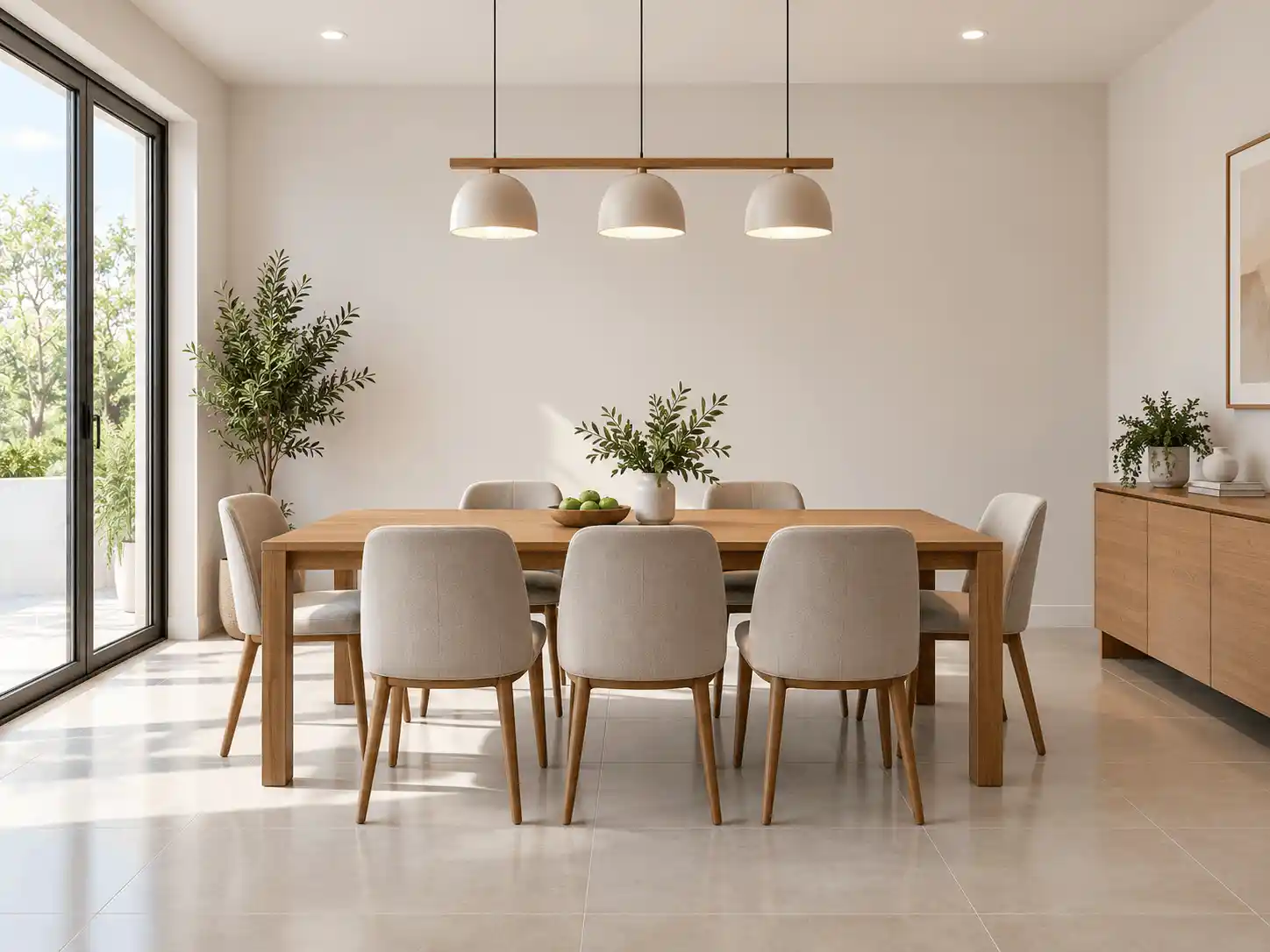
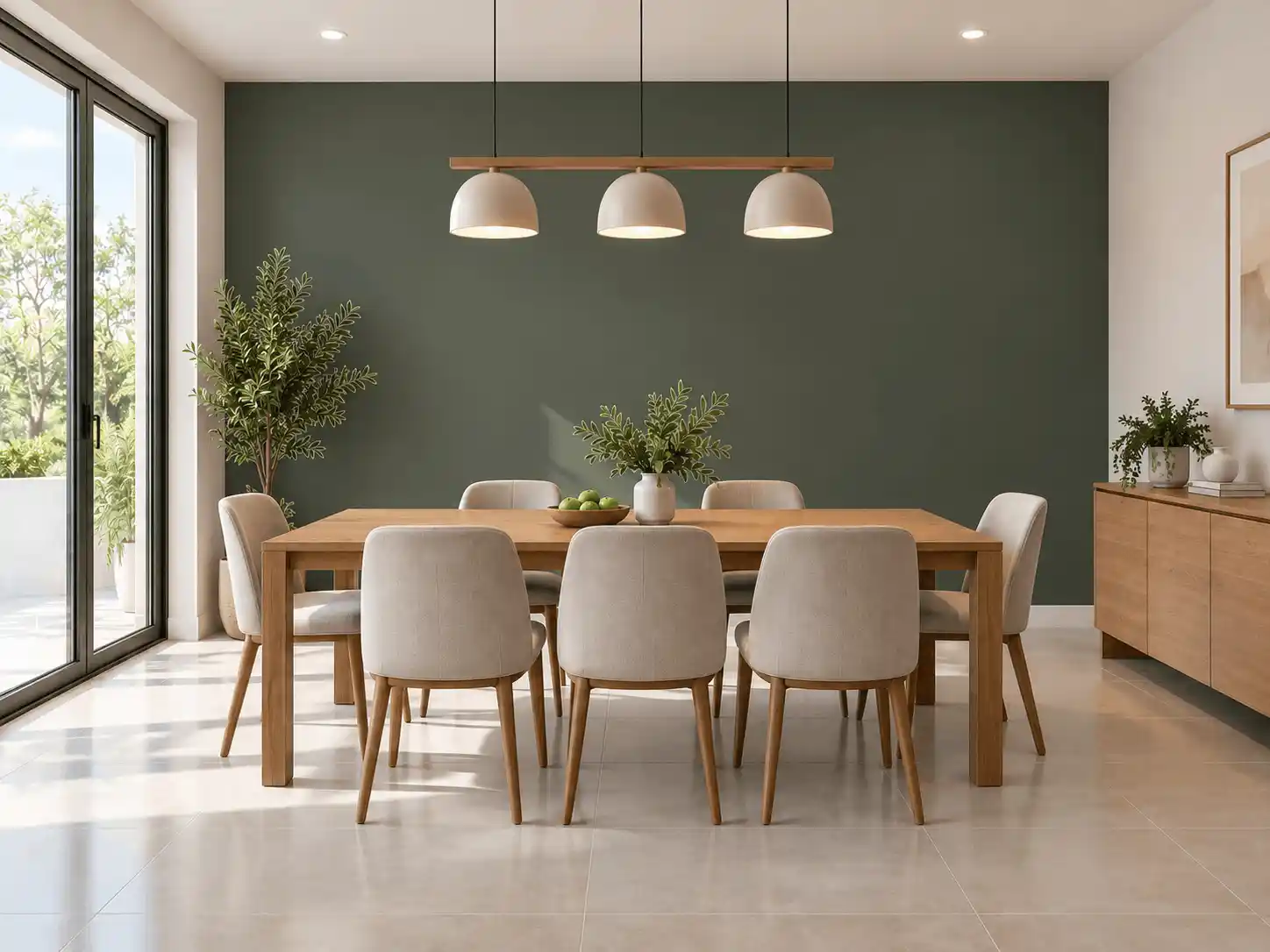
Auditioning paint on your actual living room or bedroom walls ensures you avoid picking shades that clash with your flooring or furniture. Below is an authentic before-and-after demonstration of architectural paint visualization.
Key Visual Integrity Standards
- Maintains flooring boundaries without color spillover
- Preserves authentic wall surface texture and lighting gradients
- Demonstrates how natural window light affects perceived color depth
- Interactive split-slider enables detailed quality evaluation
Interior Room Visualization
Both platforms handle interior rooms including living spaces, kitchens, bedrooms, bathrooms, and home offices. PaintVisualizer.app offers multi-brand flexibility; Behr features curated coordinating palettes.
Exterior House Visualization
Exterior visualization tests curb appeal on siding, brick, stucco, front doors, and garage trim. Behr provides sample exterior home templates; PaintVisualizer.app handles personal exterior photos with complex rooflines.
AI Paint Visualization vs Traditional Virtual Painting
Understanding the mechanical difference between basic color overlays and deep neural scene synthesis.
Traditional Color-Overlay Painting
Traditional virtual visualizers apply semi-transparent color washes over polygons, producing a flat appearance that fails to mimic physical paint sheen.
Neural Scene Understanding & Light Synthesis
Modern AI visualization separates scene geometry from lighting and surface materials, re-synthesizing the wall color so it responds naturally to ambient light.
Note: Behr Color Visualizer uses traditional color overlay technology, while PaintVisualizer.app incorporates neural scene understanding.
How Accurate Are Paint Visualizers in the Real World?
Screen color calibration, ambient room lighting, and wet paint chemistry mean digital tools cannot guarantee an exact color match. Always test physical swatches on your walls.
Mobile and Desktop Experience
Platform availability, responsive browser support, and native applications.
| Platform / Device | PaintVisualizer.app | Behr |
|---|---|---|
| Desktop Browser | Yes | YesFull web experience |
| Mobile Browser | Yes | YesMobile web available |
| iOS App | Limited | YesColorSmart by Behr mobile app |
| Android App | Limited | YesColorSmart by Behr mobile app |
| Tablet Browser | Yes | YesTablet compatible |
Pricing and Free Usage
Usage allowances, credit systems, subscriptions, and account requirements.
| Pricing Dimension | PaintVisualizer.app | Behr |
|---|---|---|
| Free Visualization | Available on both tools | Available on both tools |
| Free Usage Tier | PaintVisualizer.app provides free trial generations; Behr visualizer is free to use on web and app | PaintVisualizer.app provides free trial generations; Behr visualizer is free to use on web and app |
| Credits / Token Model | PaintVisualizer.app offers credit packs for high-volume high-res downloads | PaintVisualizer.app offers credit packs for high-volume high-res downloads |
| Subscription Plans | Optional pro tier on PaintVisualizer.app for design professionals | Optional pro tier on PaintVisualizer.app for design professionals |
| Account Requirement | No account needed for basic preview on PaintVisualizer.app; optional for saving on Behr | No account needed for basic preview on PaintVisualizer.app; optional for saving on Behr |
Who Is PaintVisualizer.app For?
- Homeowners comparing Behr against Sherwin-Williams or Benjamin Moore
- Interior designers requiring custom HEX codes and high-res client deliverables
- Users seeking automatic AI wall masking without manual polygon editing
- Contractors presenting multi-brand visual proposals to clients
Who Is Behr For?
- Homeowners planning to buy paint at The Home Depot
- DIYers looking for Behr Dynasty or Marquee one-coat hide colors
- Users who prefer testing colors on pre-masked sample room templates
- Contractors sourcing through Behr pro channels
PaintVisualizer.app: Advantages
- Multi-brand library covering 20+ manufacturers (5,000+ calibrated swatches)
- Neural AI segmentation preserves natural lighting, shadows, and textures
- Custom HEX, RGB, and color-picker support for total design freedom
- Zero-install web platform runs on desktop, mobile, and tablet
- Interactive split-screen slider for nuanced before-and-after evaluation
PaintVisualizer.app: Limitations
- High-resolution batch exports utilize cloud computing credits
- Digital preview requires confirmation with physical paint samples
Behr: Advantages
- Direct connection to The Home Depot shopping cart and retail store network
- Large library of pre-masked sample rooms across diverse residential styles
- Coordinating trim and accent palette recommendations for Behr shades
- Free to use on web and mobile
Behr: Limitations
- Strictly limited to Behr catalog; excludes Sherwin-Williams, Benjamin Moore, etc.
- Does not support arbitrary custom HEX or RGB code inputs
- Digital color overlay can appear flat under complex room lighting
- Manual polygon adjustments sometimes required on personal photo uploads
Which Tool Fits Your Project Workflow?
Guidance tailored to practical scenarios rather than subjective rankings.
| If you want to... | Consider | Why |
|---|---|---|
| Compare Behr Blank Canvas against Sherwin-Williams Alabaster | PaintVisualizer.app | Behr Color Visualizer does not permit visualizing competitor paint shades. |
| Order Behr paint directly from The Home Depot | Behr Color Visualizer | Behr visualizer natively integrates with Home Depot online ordering. |
| Upload your own room photo and get automatic AI wall segmentation | PaintVisualizer.app | Neural computer vision isolates walls automatically without manual polygon point tracing. |
| Test a custom HEX code from an interior design guide | PaintVisualizer.app | PaintVisualizer.app accepts direct HEX input; Behr tool restricts choices to Behr numbers. |
Try PaintVisualizer.app Free
Upload any room photo, test over 5,000+ designer paint shades from top global manufacturers, and see realistic daylight and shadow interactions in seconds.
Frequently Asked Questions
Clear, factual answers to common questions about PaintVisualizer.app and Behr.
Explore More Paint Visualizer Comparisons
Compare other popular paint brand tools, mobile visualizer apps, and AI design studios.
PaintVisualizer vs PPG Paints
Compare PaintVisualizer.app and PPG Paints Visualizer for room color visualization, wall painting previews, AI tools, color selection, and photo-based paint testing.
PaintVisualizer vs Asian Paints
Compare PaintVisualizer.app and Colour with Asian Paints for room color visualization, wall painting previews, AI tools, shade selection, and photo-based paint testing.
PaintVisualizer vs VisualizeColor
Compare PaintVisualizer.app and VisualizeColor for online room color visualization, wall painting previews, AI tools, photo uploads, and color exploration.
PaintVisualizer vs Sherwin-Williams
Compare PaintVisualizer.app and Sherwin-Williams ColorSnap Visualizer for room color visualization, wall painting previews, AI tools, and color exploration.
PaintVisualizer vs Dehome
Compare PaintVisualizer.app and Dehome Paint Color Visualizer for AI room color visualization, wall painting previews, area selection, and high-res results.
PaintVisualizer vs RoomsGPT
Compare PaintVisualizer.app and RoomsGPT Paint Color Visualizer for AI paint visualization, room design, wall colors, cabinets, and custom color testing.
PaintVisualizer vs Nippon Paint
Compare PaintVisualizer.app and Nippon Paint Colour Visualizer for room color visualization, wall painting previews, mobile app experience, and shade selection.
Feature information and product capabilities were compiled from publicly available documentation, first-party product portals, and active web tools as of September 2026. Features, app store availability, pricing tiers, and manufacturer shade collections are subject to change.