 PaintVisualizer
PaintVisualizer vs Dehome
Detailed Feature, Workflow & Real-World Accuracy Comparison
Artificial intelligence has transformed digital paint visualization from basic color-overlay masking into photorealistic scene re-rendering. Homeowners and interior designers looking for modern AI paint visualizers frequently encounter both PaintVisualizer.app and Dehome.
Dehome presents itself as an AI paint color visualizer featuring room photo uploads, selectable surface areas, curated color palettes, custom colors, daylight variation views, and high-resolution outputs. PaintVisualizer.app pairs cutting-edge neural scene understanding with an expansive library of 5,000+ verified architectural paint formulas from over 20 global manufacturers, allowing users to connect their visual experiments directly to real paint cans.
This comparative analysis evaluates AI segmentation fidelity, brand color calibration, lighting simulation, usage limits, and workflow flexibility to help you select the ideal tool for your renovation.
Quick Comparison: PaintVisualizer.app vs Dehome
A comprehensive side-by-side feature matrix verified against active platform capabilities.
| Feature / Capability | PaintVisualizer.app | Dehome Paint Color Visualizer |
|---|---|---|
Upload your own photo Both support personal room uploads | Yes | Yes |
Interior visualization Living rooms, bedrooms, kitchens, baths | Yes | Yes |
Exterior visualization PV provides dedicated exterior facade support | Yes | Limited |
Wall visualization Primary wall surfaces supported | Yes | Yes |
Ceiling visualization Selectable ceiling recoloring | Yes | Yes |
Trim / doors / cabinets PV features detailed trim and millwork preservation | Yes | Limited |
AI-assisted visualization Both utilize modern neural AI generation | Yes | Yes |
Color picker Custom color pickers available | Yes | Yes |
Custom HEX / RGB colors Both accept arbitrary color codes | Yes | Yes |
Paint brand colors PV features 5,000+ verified brand formulas; Dehome focuses on palettes | Yes | Limited |
Multiple color comparison Multi-color exploration supported | Yes | Yes |
Before / after slider Interactive split-screen slider in PV | Yes | Limited |
Save projects Project storage supported | Yes | Yes |
Download results High-res image downloads | Yes | Yes |
Share results Direct link and image sharing | Yes | Yes |
Browser support Chrome, Safari, Edge, Firefox | Yes | Yes |
Mobile browser support Responsive web experience | Yes | Yes |
Account required to try PV allows instant guest testing | No | Limited |
Free usage tier Free trial credits provided | Yes | Limited |
Physical paint sample recommendation PV emphasizes real-world paint verification | Yes | Limited |
What Is PaintVisualizer.app?
PaintVisualizer.app is an AI-powered architectural visualization platform built specifically to bridge the gap between digital room previews and real-world paint purchases. Users upload a room or exterior photo, and the neural engine segments walls, trims, and ceilings while preserving authentic window daylight, soft shadows, and furniture reflections. PaintVisualizer.app features over 5,000+ calibrated swatches from brands like Sherwin-Williams, Benjamin Moore, Behr, Asian Paints, and PPG, alongside custom HEX inputs and interactive before-and-after sliders.
What Is Dehome?
Dehome is an AI-focused interior color visualization application that allows users to upload room photos, select specific surface regions (such as walls, ceilings, and floors), and apply custom colors or curated designer palettes. It emphasizes AI-assisted rendering, multiple lighting perspectives, and high-definition image generation under a credit-based usage model.
How Do PaintVisualizer.app and Dehome Work?
Compare the step-by-step workflow from uploading a room photo to reviewing final color renders.
PaintVisualizer.app Workflow
Upload Room or Exterior Photo
Upload any high-res image directly in your browser without software installs.
Neural Surface Segmentation
AI detects walls, ceilings, and trim automatically, preserving furniture and flooring.
Audition Real Brand Swatches or HEX
Select verified paint shades from 20+ manufacturers or input custom hex values.
Light & Shadow Harmonization
The rendering engine integrates the new pigment into existing room daylight and shadows.
Interactive Split-Slider Review
Swipe smoothly between original and repainted states with an interactive slider.
Download Contractor Spec Sheet
Export high-res renders paired with exact manufacturer paint codes.
Dehome Workflow
Navigate to Dehome Web Portal
Access Dehome online and log in to a user account.
Upload Room Photograph
Upload an interior room picture into the AI processing queue.
Select Target Surfaces
Choose which surfaces (walls, accent planes, ceiling) to recolor.
Choose Palette or Custom Color
Pick from curated palettes or input a custom color value.
Generate AI Room Render
Wait for the cloud AI model to synthesize the repainted scene.
Export High-Resolution Output
Download the rendered room image using available account credits.
PaintVisualizer.app vs Dehome: Feature Deep Dive
Detailed technical differences across photo upload, boundary detection, color matching, and rendering.
Photo Upload & Processing
Accepts photos of any interior space or exterior building, automatically adjusting for perspective and ambient lighting.
Supports standard image uploads for interior spaces, queueing files for AI segmentation and rendering.
Surface Selection & Masking
Neural network automatically identifies walls, ceilings, and trim while protecting furniture, art, and flooring from color bleed.
Allows users to designate selectable regions (walls, ceilings, floors) for targeted recoloring.
Color Palettes & Real-World Brands
Integrates 5,000+ verified manufacturer paint codes (SW, BM, Behr, Asian Paints) alongside custom HEX codes.
Emphasizes curated designer color palettes, aesthetic color swatches, and custom color inputs.
AI Generation & Realism
Neural engine focuses on preserving the physical architecture of the room: existing daylight, soft corner shadows, and surface texture.
Uses generative AI to render repainted scenes, offering multiple lighting variations.
Before & After Comparison Tools
Includes an interactive split-screen slider that lets users swipe smoothly across the room to examine transitions.
Provides static before-and-after views or toggle switches to compare versions.
Exports & Project Hand-Off
Exports high-resolution preview images along with a paint spec card detailing exact color names and manufacturer codes.
Allows downloading generated high-resolution renderings using account credits.
Paint Brands and Color Library Coverage
Compare manufacturer shade databases and color formulation support.
| Paint Brand / Source | PaintVisualizer.app | Dehome |
|---|---|---|
Sherwin-Williams PV has dedicated shade search; Dehome uses generic color matching | Yes (1,700+ shades) | Limited |
Benjamin Moore PV has full BM catalog | Yes (3,500+ shades) | Limited |
Behr PV has full Behr catalog | Yes (Full library) | Limited |
Asian Paints Excluded on Dehome | Yes (2,200+ shades) | No |
PPG Paints PV has calibrated database | Yes (Calibrated) | Limited |
Custom HEX & RGB codes Both accept direct HEX values | Yes (Direct input) | Yes |
Visualizing Paint Colors on Your Own Room
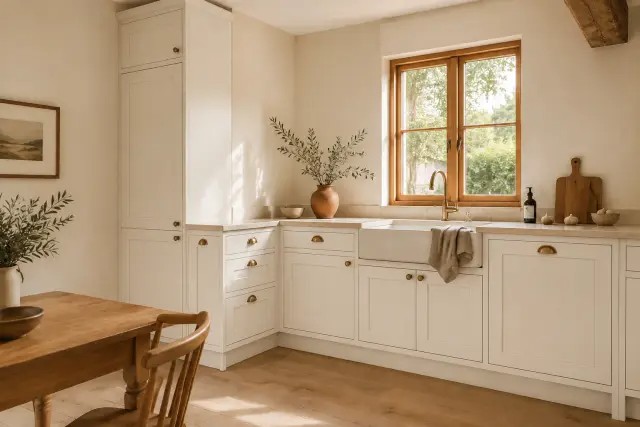
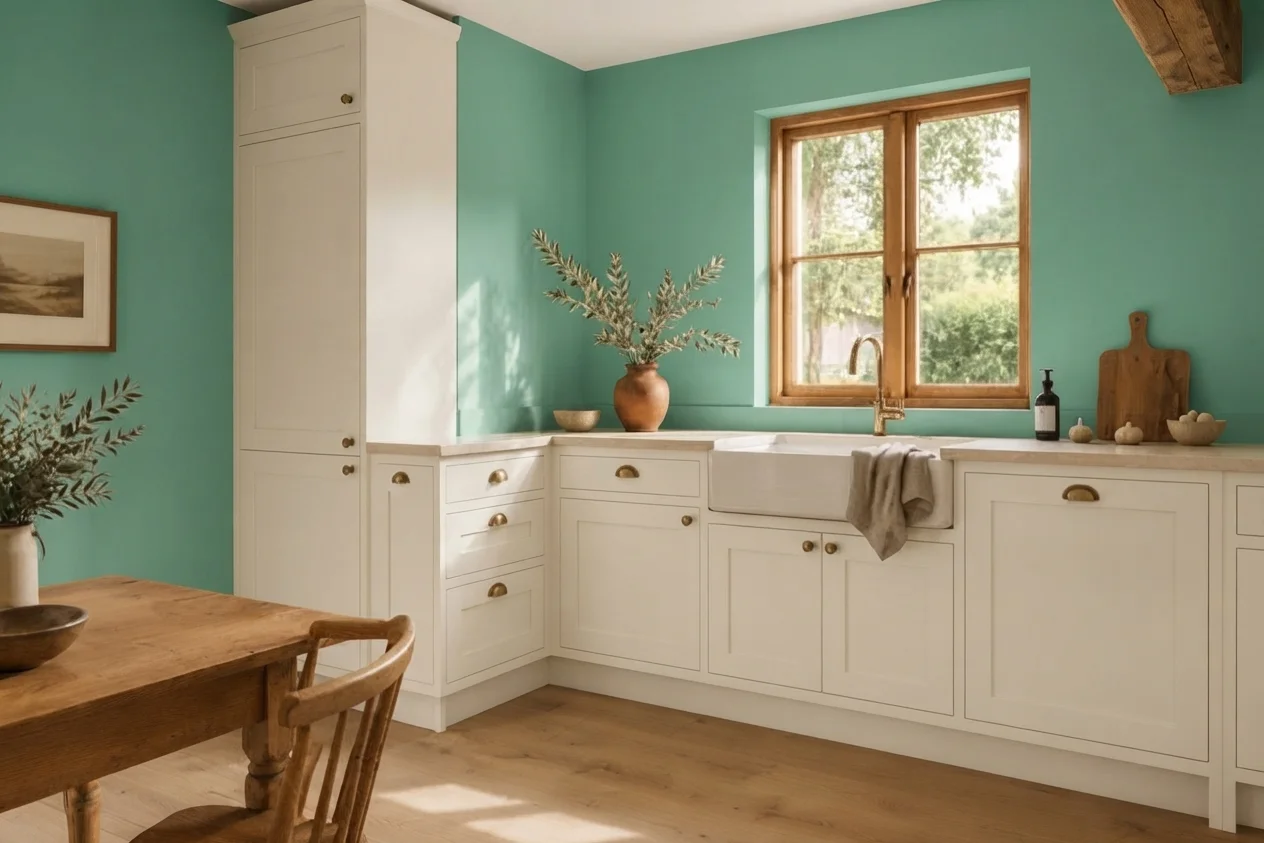
AI visualizers allow you to test how modern tones interact with your actual room layout, furniture, and daylight. Below is an authentic before-and-after room transformation showing photorealistic AI paint rendering.
Key Visual Integrity Standards
- Preserves hardwood, tile, and stone floorings perfectly
- Retains realistic wall texture, corner seams, and ceiling junctions
- Maintains natural light falloff from windows and lamps
- Interactive slider lets you compare before and after seamlessly
Interior Room Visualization
Both platforms support interior living spaces, kitchens, bedrooms, and bathrooms. PaintVisualizer.app offers specialized architectural paint brand formulas, while Dehome provides curated aesthetic palettes.
Exterior House Visualization
Exterior visualization tests curb appeal on siding, brick, and shutters. PaintVisualizer.app includes dedicated exterior neural models; Dehome is primarily optimized for interior room spaces.
AI Paint Visualization vs Traditional Virtual Painting
Understanding the mechanical difference between basic color overlays and deep neural scene synthesis.
Traditional Color-Overlay Painting
Older tools rely on flat digital color fills that disregard room lighting geometry, producing artificial-looking mockups.
Neural Scene Understanding & Light Synthesis
Modern AI visualizers understand scene depth, material textures, and ambient illumination, synthesizing the new pigment directly into the image.
Note: Both PaintVisualizer.app and Dehome use advanced AI, but PaintVisualizer.app grounds its output in verified physical paint formulas.
How Accurate Are Paint Visualizers in the Real World?
While AI visualizers generate stunning digital previews, physical paint swatches remain indispensable before purchasing paint.
Mobile and Desktop Experience
Platform availability, responsive browser support, and native applications.
| Platform / Device | PaintVisualizer.app | Dehome |
|---|---|---|
| Desktop Browser | Yes | YesWeb-based interface |
| Mobile Browser | Yes | YesMobile web supported |
| iOS App | Limited | NoWeb-first platforms |
| Android App | Limited | NoWeb-first platforms |
| Tablet Browser | Yes | YesTablet compatible |
Pricing and Free Usage
Usage allowances, credit systems, subscriptions, and account requirements.
| Pricing Dimension | PaintVisualizer.app | Dehome |
|---|---|---|
| Free Visualization | Available on both platforms | Available on both platforms |
| Free Usage Tier | PaintVisualizer.app offers free trial generations; Dehome provides limited starter credits | PaintVisualizer.app offers free trial generations; Dehome provides limited starter credits |
| Credits / Token Model | Both platforms offer credit packs for high-volume high-resolution rendering | Both platforms offer credit packs for high-volume high-resolution rendering |
| Subscription Plans | Optional subscription tiers available for regular users and professionals | Optional subscription tiers available for regular users and professionals |
| Account Requirement | No account needed for initial test on PaintVisualizer.app; Dehome typically requires sign-in | No account needed for initial test on PaintVisualizer.app; Dehome typically requires sign-in |
Who Is PaintVisualizer.app For?
- Homeowners wanting to test real paint brand codes (Sherwin-Williams, Benjamin Moore, Behr, Asian Paints)
- Contractors and painters needing exact paint formulas for client proposals
- Users looking for instant, guest-friendly room testing without forced sign-up
- Renovators evaluating both interior rooms and exterior house facades
Who Is Dehome For?
- Design enthusiasts exploring aesthetic color palettes and AI room restyling
- Users looking for alternative lighting views for interior spaces
- Social media creators generating inspirational interior renders
- Homeowners seeking curated decorator palettes
PaintVisualizer.app: Advantages
- Direct connection to 5,000+ verified manufacturer paint formulas
- Neural AI segmentation preserves natural lighting, shadows, and textures
- Dedicated support for exterior house facades as well as interior rooms
- Interactive split-screen slider for nuanced before-and-after evaluation
- Guest-friendly workflow with no initial sign-up required
PaintVisualizer.app: Limitations
- High-resolution batch exports utilize cloud computing credits
- Digital preview requires confirmation with physical paint samples
Dehome: Advantages
- Modern AI-driven interface with selectable surface regions
- Curated decorator color palettes and custom color inputs
- Alternative lighting visualization options for interior spaces
Dehome: Limitations
- Does not connect colors to comprehensive physical paint brand catalogs
- Limited exterior facade visualization capabilities
- Credit limits can be restrictive for extensive experimentation
- Requires account creation for most generation workflows
Which Tool Fits Your Project Workflow?
Guidance tailored to practical scenarios rather than subjective rankings.
| If you want to... | Consider | Why |
|---|---|---|
| Test specific paint brand colors (like BM Chantilly Lace or SW Agreeable Gray) | PaintVisualizer.app | PaintVisualizer.app contains verified formulas for over 5,000+ real paint brand shades. |
| Experiment with curated aesthetic palettes and custom hex colors | Both tools | Both platforms support custom hex values and curated palette inspiration. |
| Visualize exterior house siding and brick | PaintVisualizer.app | PaintVisualizer.app includes dedicated neural models for exterior architecture. |
| Inspect room transitions with an interactive split-slider | PaintVisualizer.app | PaintVisualizer.app features an integrated interactive before-and-after slider. |
Try PaintVisualizer.app Free
Upload any room photo, test over 5,000+ designer paint shades from top global manufacturers, and see realistic daylight and shadow interactions in seconds.
Frequently Asked Questions
Clear, factual answers to common questions about PaintVisualizer.app and Dehome.
Explore More Paint Visualizer Comparisons
Compare other popular paint brand tools, mobile visualizer apps, and AI design studios.
PaintVisualizer vs PPG Paints
Compare PaintVisualizer.app and PPG Paints Visualizer for room color visualization, wall painting previews, AI tools, color selection, and photo-based paint testing.
PaintVisualizer vs Asian Paints
Compare PaintVisualizer.app and Colour with Asian Paints for room color visualization, wall painting previews, AI tools, shade selection, and photo-based paint testing.
PaintVisualizer vs VisualizeColor
Compare PaintVisualizer.app and VisualizeColor for online room color visualization, wall painting previews, AI tools, photo uploads, and color exploration.
PaintVisualizer vs Sherwin-Williams
Compare PaintVisualizer.app and Sherwin-Williams ColorSnap Visualizer for room color visualization, wall painting previews, AI tools, and color exploration.
PaintVisualizer vs RoomsGPT
Compare PaintVisualizer.app and RoomsGPT Paint Color Visualizer for AI paint visualization, room design, wall colors, cabinets, and custom color testing.
PaintVisualizer vs Nippon Paint
Compare PaintVisualizer.app and Nippon Paint Colour Visualizer for room color visualization, wall painting previews, mobile app experience, and shade selection.
PaintVisualizer vs Behr
Compare PaintVisualizer.app and Behr Color Visualizer for room color visualization, wall painting previews, AI tools, sample rooms, and color exploration.
Feature information and product capabilities were compiled from publicly available documentation, first-party product portals, and active web tools as of September 2026. Features, app store availability, pricing tiers, and manufacturer shade collections are subject to change.