 PaintVisualizer
 PPG Paints
PaintVisualizer vs PPG Paints
Detailed Feature, Workflow & Real-World Accuracy Comparison
Choosing a paint color is significantly easier when you can see it rendered directly on your own walls before purchasing cans. Both PaintVisualizer.app and PPG Paints Visualizer enable users to audition paint colors digitally, but their design goals, color ecosystem flexibility, and rendering mechanics address different project needs.
PPG Paints Visualizer is closely tied to PPG’s architectural coatings catalog, focusing on helping homeowners and contractors explore official PPG palettes, curated color families, and regional store formulations. In contrast, PaintVisualizer.app functions as an open, multi-brand AI visualizer engineered for cross-brand color exploration, custom HEX inputs, and photorealistic daylight-aware wall segmentation.
This side-by-side comparison explores photo upload capabilities, wall edge detection, lighting retention, brand library coverage, pricing, and practical project workflows to help you determine which tool best supports your home renovation.
Quick Comparison: PaintVisualizer.app vs PPG Paints
A comprehensive side-by-side feature matrix verified against active platform capabilities.
| Feature / Capability | PaintVisualizer.app | PPG Paints Visualizer |
|---|---|---|
Upload your own photo Both support personal photo uploads | Yes | Yes |
Interior visualization Living rooms, bedrooms, kitchens, baths | Yes | Yes |
Exterior visualization Siding, brick, stucco, trims | Yes | Yes |
Wall visualization Full wall detection and colorization | Yes | Yes |
Ceiling visualization PPG focuses primarily on vertical wall areas | Yes | Limited |
Trim / doors / cabinets Manual masking required in PPG for intricate trim | Yes | Limited |
AI-assisted visualization PPG uses geometric edge detection; PV uses neural scene understanding | Yes | Limited |
Color picker Eyedropper and palette selectors available | Yes | Yes |
Custom HEX / RGB colors PPG limits selection to PPG proprietary codes | Yes | No |
Paint brand colors PV supports 20+ brands; PPG supports PPG collections only | Yes | Limited |
Multiple color comparison Side-by-side swatch comparison | Yes | Yes |
Before / after slider PV features integrated interactive comparison slider | Yes | Limited |
Save projects Requires account on both tools | Yes | Yes |
Download results Export high-resolution images | Yes | Yes |
Share results Email and direct link sharing | Yes | Yes |
Browser support Chrome, Safari, Edge, Firefox | Yes | Yes |
Mobile browser support PPG desktop experience offers higher precision than mobile | Yes | Limited |
Account required to try Both allow preliminary previews without immediate login | No | No |
Free usage tier Free web preview options provided | Yes | Yes |
Physical paint sample recommendation Both strongly advocate ordering physical test swatches | Yes | Yes |
What Is PaintVisualizer.app?
PaintVisualizer.app is an AI-powered architectural paint visualization platform designed to help homeowners, interior designers, and contractors test authentic wall colors before buying paint. By uploading a real photograph of any room or house exterior, users can leverage deep computer vision to segment walls and trims automatically while maintaining natural window illumination, shadows, and flooring reflections. The platform supports over 5,000+ color-calibrated swatches spanning Asian Paints, Sherwin-Williams, Benjamin Moore, Behr, Dulux, PPG, and custom HEX codes.
What Is PPG Paints?
PPG Paints Paint Color Visualizer is an official digital color tool developed by PPG Industries. It allows users to upload personal room photos or explore pre-masked sample architectural spaces to preview PPG paint colors. Key capabilities include automated and manual edge detection, color family browsing (such as The Voice of Color collection), project saving, and locating nearby PPG paint retailers and dealers for physical swatch ordering.
How Do PaintVisualizer.app and PPG Paints Work?
Compare the step-by-step workflow from uploading a room photo to reviewing final color renders.
PaintVisualizer.app Workflow
Upload Room or House Photo
Upload any standard JPG, PNG, or WEBP photo of an interior room or exterior facade.
Automated Neural Surface Detection
The AI model automatically segments wall planes, separating millwork, curtains, furniture, and lighting.
Select from 20+ Brands or Custom HEX
Audition shades from PPG, Sherwin-Williams, Behr, Asian Paints, or input exact hex codes.
Daylight & Shadow Rendering
The engine adjusts the virtual pigment against your photo’s natural light source and room ambient occlusion.
Split-Screen Before & After Review
Compare the unpainted original space directly with the visualized paint render using an interactive slider.
Export & Share Specification Sheet
Download high-resolution renders and pigment codes to share with painters, clients, or family members.
PPG Paints Workflow
Access PPG Visualizer Web Portal
Launch the web-based visualizer on desktop or mobile browser via PPG Paints.
Upload Photo or Pick Demo Scene
Choose a pre-formatted stock interior or upload a personal room photograph.
Refine Surface Boundaries
Use automated edge detection or click-and-drag manual boundary points around walls and trim.
Browse PPG Color Families
Select shades from PPG collections including Voice of Color, trending palettes, and neutral fan decks.
Apply Digital Color Wash
Click selected zones to fill surfaces with digital tint representations of PPG paint numbers.
Save Project or Find Retailer
Save your customized room file to a PPG account or find local dealers carrying physical PPG paints.
PaintVisualizer.app vs PPG Paints: Feature Deep Dive
Detailed technical differences across photo upload, boundary detection, color matching, and rendering.
Photo Upload & Format Requirements
Accepts high-resolution JPG, PNG, and modern WEBP images up to 25MB. Automatically optimizes lighting calibration upon upload without requiring manual perspective flattening.
Supports standard JPEG and PNG uploads. Offers a library of pre-masked residential rooms (kitchens, master bedrooms, suburban exteriors) if users do not have a photo prepared.
Wall Segmentation & Boundary Detection
Uses semantic neural network segmentation to discern wall surfaces from furniture edges, door casings, window frames, and floorboards automatically.
Uses edge-tracing algorithms combined with manual point-and-click polygon adjustment tools to refine mask boundaries before applying color.
Color Exploration & Shade Selection
Enables cross-brand searching across 20+ manufacturers, color family exploration, light reflectance value (LRV) filtering, and arbitrary HEX/RGB code entry.
Focuses entirely on PPG color collections, including The Voice of Color, PPG Timeless palettes, trending designer fan decks, and manufacturer paint numbers.
Rendering Engine & Lighting Realism
Neural color transformation calculates the interaction between the target pigment and ambient room illumination, preserving soft shadows, window sunbeams, and wall textures.
Applies a digital color overlay across segmented regions with preset opacity blending to simulate how PPG shades appear on wall surfaces.
Before & After Comparison Tools
Includes an interactive, draggable split-screen slider allowing users to inspect micro-details, transitions around trim, and daylight responses between original and repainted states.
Provides toggle buttons and side-by-side split views to toggle between the original photo and the colorized preview.
Project Archiving & Contractor Handoff
Exports high-resolution preview images along with a paint spec card detailing exact color names, manufacturer formulas, and complementary accent recommendations.
Enables saving projects to a PPG user profile, generating a printable color summary, and finding certified PPG dealers to purchase wet paint.
Paint Brands and Color Library Coverage
Compare manufacturer shade databases and color formulation support.
| Paint Brand / Source | PaintVisualizer.app | PPG Paints |
|---|---|---|
PPG / Voice of Color PPG official home | Yes (Calibrated) | Yes (Official Catalog) |
Sherwin-Williams Competitor brand excluded from PPG | Yes (1,700+ shades) | No |
Benjamin Moore Competitor brand excluded from PPG | Yes (3,500+ shades) | No |
Behr Competitor brand excluded from PPG | Yes (Full library) | No |
Asian Paints Regional competitor excluded | Yes (2,200+ shades) | No |
Berger Paints Excluded from PPG | Yes (Calibrated) | No |
Nerolac Excluded from PPG | Yes (Calibrated) | No |
Dulux Excluded from PPG | Yes (Calibrated) | No |
Nippon Paint Excluded from PPG | Yes (Calibrated) | No |
Custom HEX & RGB codes PPG only permits PPG paint numbers | Yes (Direct input) | No |
Visualizing Paint Colors on Your Own Room
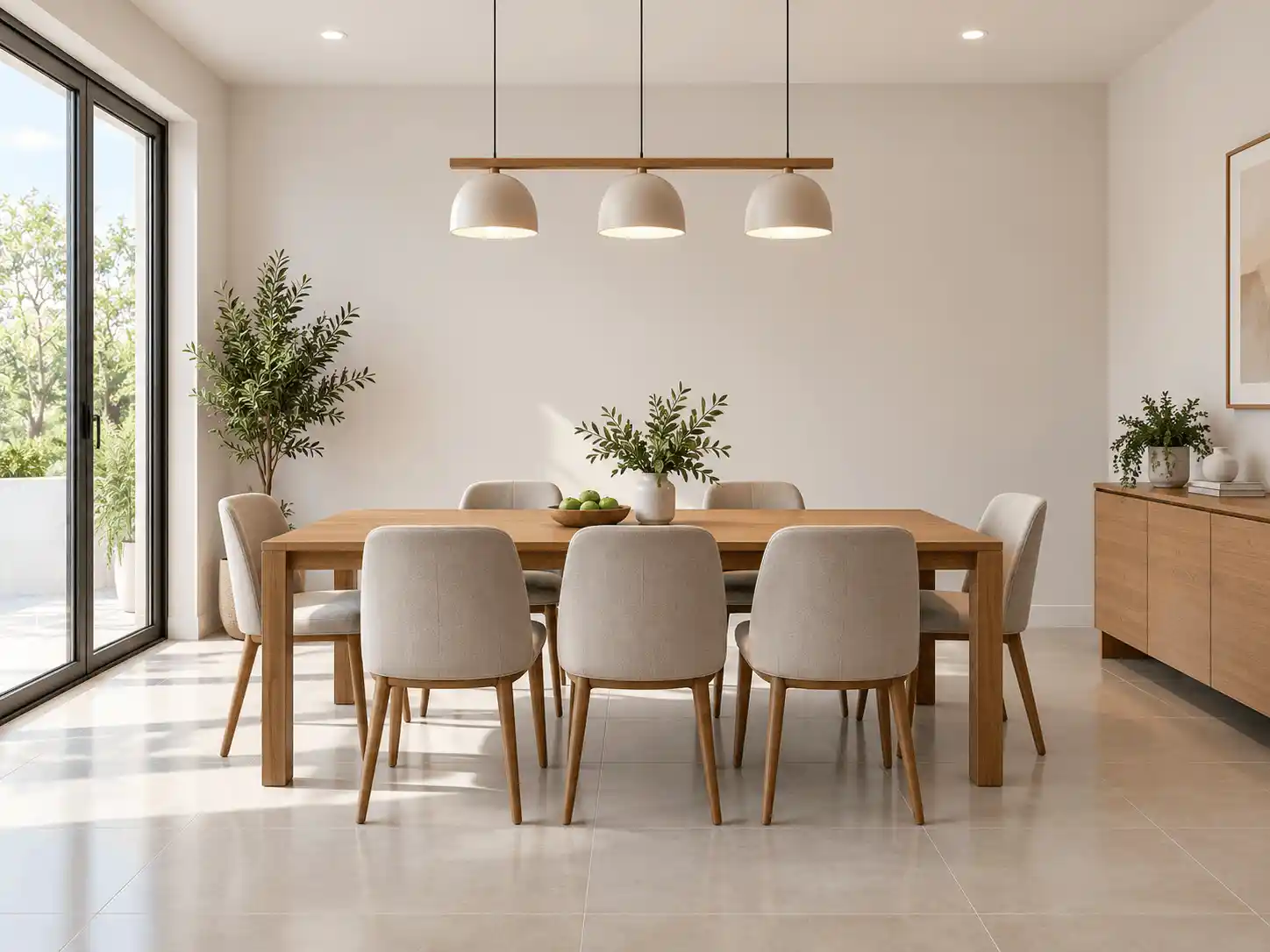
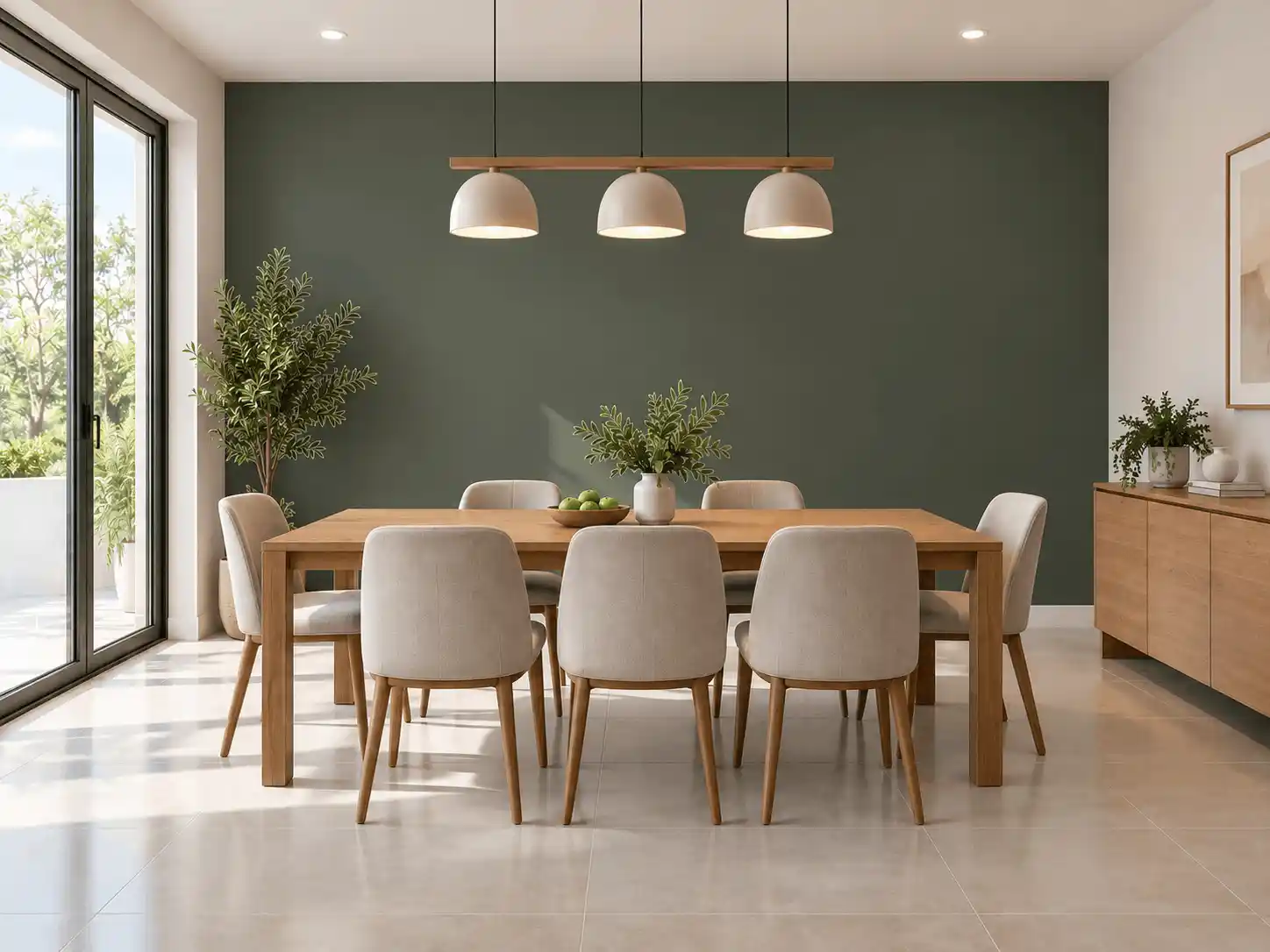
Visualizing paint on your actual living room, kitchen, or exterior siding is far more informative than inspecting paper paint swatches in an artificially lit showroom. Below is an authentic before-and-after room transformation showing how digital visualization preserves ambient shadows, flooring reflections, and furniture borders.
Key Visual Integrity Standards
- Preserves hardwood, carpet, and stone floorings without color bleeding
- Retains realistic wall texture, corner bevels, and ceiling junctions
- Maintains natural light falloff from windows and overhead fixtures
- Allows instantaneous side-by-side color comparisons before painting
Interior Room Visualization
PaintVisualizer.app and PPG Paints Visualizer both support comprehensive interior spaces including open-plan living rooms, bedrooms, galley kitchens, bathrooms, and home offices. Surface isolation lets you test accent walls without repainting the entire room.
Exterior House Visualization
Exterior visualization tests curb appeal on siding, brick masonry, stucco facades, shutters, front doors, and garage frames. PPG provides exterior demo templates, while PaintVisualizer.app excels at processing uploaded personal home photos with foliage and rooflines.
AI Paint Visualization vs Traditional Virtual Painting
Understanding the mechanical difference between basic color overlays and deep neural scene synthesis.
Traditional Color-Overlay Painting
Traditional virtual room painting software relies on basic color replacement: an edge-detection mask isolates a polygon, and a digital color layer is multiplied over the pixels. While fast, this method often flattens wall textures, creates halos around furniture, and fails to model how real pigment absorbs warm or cool daylight.
Neural Scene Understanding & Light Synthesis
Modern AI visualization incorporates deep scene understanding. The neural model recognizes scene depth, ambient light sources, shadow gradients, and material reflectance, rendering the virtual paint as if physical pigment were applied under actual room conditions.
Note: PPG’s tool delivers an efficient brand-specific color mockup, whereas PaintVisualizer.app leverages AI scene understanding for photorealistic shadow and texture retention.
How Accurate Are Paint Visualizers in the Real World?
Digital visualizers provide an exceptional starting point to eliminate unappealing shades, but no computer monitor or smartphone screen can perfectly replicate physical paint. Display color gamuts, ambient room lighting, and wet-versus-dry paint chemical properties all impact real-world results.
Mobile and Desktop Experience
Platform availability, responsive browser support, and native applications.
| Platform / Device | PaintVisualizer.app | PPG Paints |
|---|---|---|
| Desktop Browser | Yes | YesFull feature set on modern browsers |
| Mobile Browser | Yes | LimitedTouch-optimized AI in PV; PPG interface is denser |
| iOS App | Limited | LimitedResponsive web platform prioritizes zero-install access |
| Android App | Limited | LimitedMobile web available on all devices |
| Tablet Browser | Yes | YesiPad and Android tablet compatible |
Pricing and Free Usage
Usage allowances, credit systems, subscriptions, and account requirements.
| Pricing Dimension | PaintVisualizer.app | PPG Paints |
|---|---|---|
| Free Visualization | Available on both tools | Available on both tools |
| Free Usage Tier | PaintVisualizer.app offers free exploratory credits; PPG provides free web usage for PPG paints | PaintVisualizer.app offers free exploratory credits; PPG provides free web usage for PPG paints |
| Credits / Token Model | PaintVisualizer.app offers transparent credit packs for high-volume high-res exports | PaintVisualizer.app offers transparent credit packs for high-volume high-res exports |
| Subscription Plans | Optional pro tiers available on PaintVisualizer.app for contractors and designers | Optional pro tiers available on PaintVisualizer.app for contractors and designers |
| Account Requirement | No initial account required to experiment; needed to save project history | No initial account required to experiment; needed to save project history |
Who Is PaintVisualizer.app For?
- Homeowners comparing multiple paint brands (e.g., SW vs PPG vs Behr)
- Interior designers needing custom HEX and high-resolution client renders
- Painting contractors wanting fast before-and-after visuals for proposals
- Users seeking automated AI wall masking without manual polygon drawing
Who Is PPG Paints For?
- Dedicated PPG paint customers and commercial specifiers
- Homeowners working with professional painters who source exclusively through PPG
- DIYers wanting quick access to official Voice of Color paint formulas
- Users looking for direct links to local PPG retail stockists
PaintVisualizer.app: Advantages
- Multi-brand library covering 20+ manufacturers (5,000+ calibrated swatches)
- Neural AI segmentation preserves delicate daylight and shadow gradients
- Custom HEX, RGB, and color-picker inputs supported
- Interactive split-screen before-and-after slider for seamless comparison
- No brand lock-in: compare PPG against Sherwin-Williams, Benjamin Moore, or Behr
PaintVisualizer.app: Limitations
- Advanced high-resolution batch renders utilize credits for heavy volume
- Digital visualization requires final verification with physical paint swatches
PPG Paints: Advantages
- Direct connection to PPG’s official product lines and store locators
- Pre-loaded catalog of sample architectural rooms for fast testing
- Free web tool focused strictly on PPG dealer formulas
PPG Paints: Limitations
- Excludes competing brands like Sherwin-Williams, Benjamin Moore, and Asian Paints
- Does not support arbitrary custom HEX or RGB color entries
- Edge detection frequently requires manual boundary point adjustments on complex photos
- Mobile web interface can be cumbersome compared to dedicated modern layouts
Which Tool Fits Your Project Workflow?
Guidance tailored to practical scenarios rather than subjective rankings.
| If you want to... | Consider | Why |
|---|---|---|
| Visualize colors on your own room photo with AI | PaintVisualizer.app | Automated neural segmentation handles complex furniture boundaries without manual tracing. |
| Audition only official PPG Voice of Color shades | PPG Paints Visualizer | Directly cataloged with official PPG product line formulas and store availability. |
| Compare PPG shades against Sherwin-Williams or Behr | PaintVisualizer.app | Only multi-brand visualizers allow side-by-side testing of rival brand formulations. |
| Test a custom HEX code from a designer palette | PaintVisualizer.app | PPG Paints Visualizer restricts color choices strictly to PPG proprietary codes. |
| Find a local supplier with wet paint in stock | PPG Paints Visualizer | Includes native integration with PPG distribution centers and independent dealers. |
Try PaintVisualizer.app Free
Upload any room photo, test over 5,000+ designer paint shades from top global manufacturers, and see realistic daylight and shadow interactions in seconds.
Frequently Asked Questions
Clear, factual answers to common questions about PaintVisualizer.app and PPG Paints.
Explore More Paint Visualizer Comparisons
Compare other popular paint brand tools, mobile visualizer apps, and AI design studios.
PaintVisualizer vs Asian Paints
Compare PaintVisualizer.app and Colour with Asian Paints for room color visualization, wall painting previews, AI tools, shade selection, and photo-based paint testing.
PaintVisualizer vs VisualizeColor
Compare PaintVisualizer.app and VisualizeColor for online room color visualization, wall painting previews, AI tools, photo uploads, and color exploration.
PaintVisualizer vs Sherwin-Williams
Compare PaintVisualizer.app and Sherwin-Williams ColorSnap Visualizer for room color visualization, wall painting previews, AI tools, and color exploration.
PaintVisualizer vs Dehome
Compare PaintVisualizer.app and Dehome Paint Color Visualizer for AI room color visualization, wall painting previews, area selection, and high-res results.
PaintVisualizer vs RoomsGPT
Compare PaintVisualizer.app and RoomsGPT Paint Color Visualizer for AI paint visualization, room design, wall colors, cabinets, and custom color testing.
PaintVisualizer vs Nippon Paint
Compare PaintVisualizer.app and Nippon Paint Colour Visualizer for room color visualization, wall painting previews, mobile app experience, and shade selection.
PaintVisualizer vs Behr
Compare PaintVisualizer.app and Behr Color Visualizer for room color visualization, wall painting previews, AI tools, sample rooms, and color exploration.
Feature information and product capabilities were compiled from publicly available documentation, first-party product portals, and active web tools as of September 2026. Features, app store availability, pricing tiers, and manufacturer shade collections are subject to change.